> ## Documentation Index
> Fetch the complete documentation index at: https://support.pexcard.com/llms.txt
> Use this file to discover all available pages before exploring further.
# How to Activate a New PEX Card on All Programs
> Activate a newly mailed PEX card as the business administrator so cardholders can begin using it for purchases.
**Note:**
**Important note for cardholders:** If your card is purple, you can activate your card by following the instructions in the cardholder guide that shipped with your card.
For all other cards, only a business administrator can activate your card. Please contact your business administrator directly.
To register your card and be able to access your card account, please see "[How to create a new cardholder account.](/cardholder-guide/how-to-create-a-new-cardholder-user-account)"
For security purposes, all PEX cards are inactive when they are mailed. As a business administrator, you will need to activate a card before the card can be used for purchases. The instructions below only apply for business administrators on a Prepaid & Charge Expense program. If your cards are purple, cardholders must activate their own cards using the instructions provided above.
## How to Activate a New PEX Card as an Administrator
Log into [dashboard.pexcard.com](https://dashboard.pexcard.com?utm_source=support) using your administrator credentials
Click the "Cards" tab on the left
Locate the Cardholder's name
Click the dropdown under Status that says "Inactive"
Select "Active"
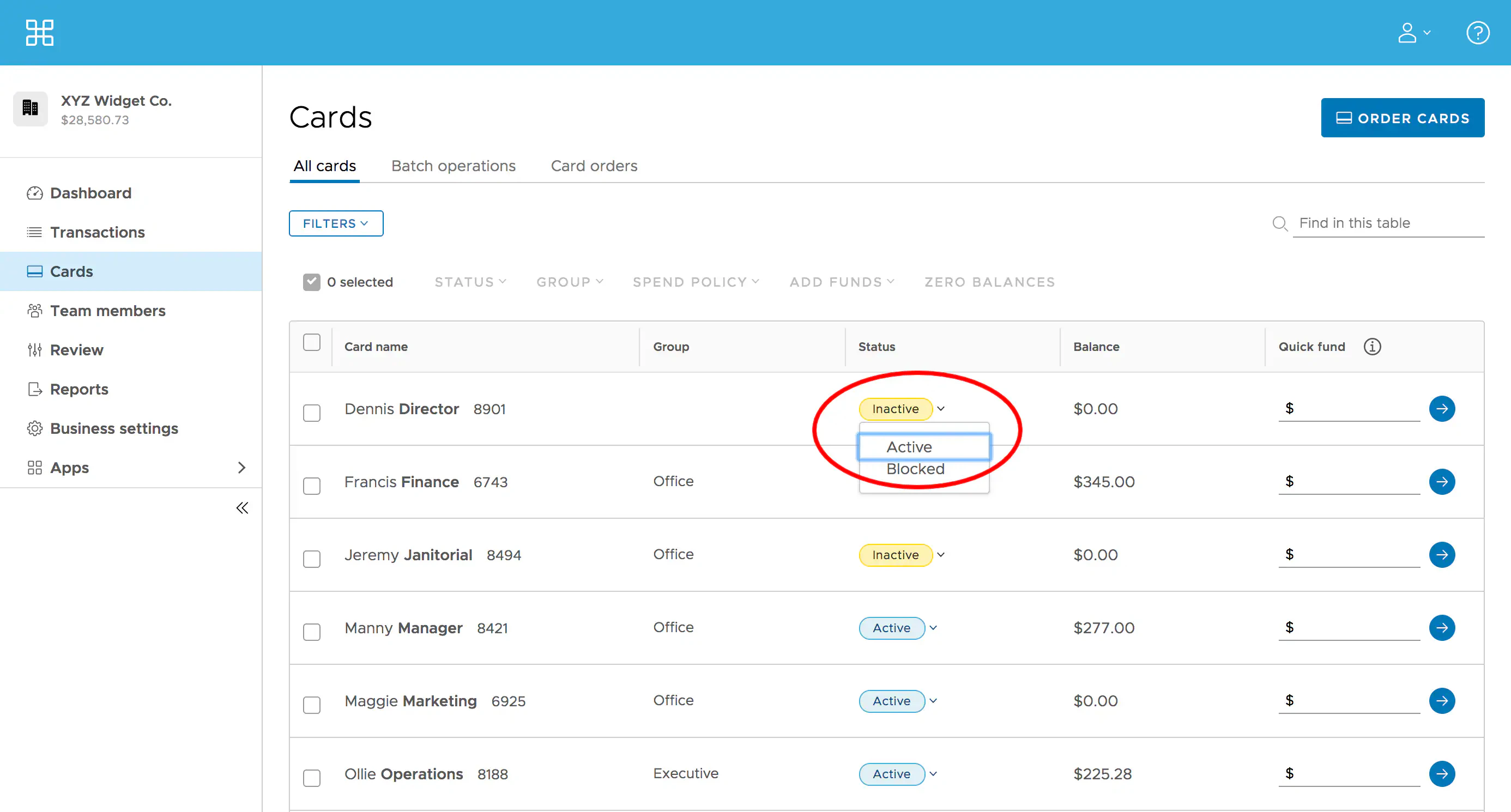 *Click "Active" Status to activate the new PEX Card*
## Related topics
If you want to activate multiple cards, you may want to read "[How to Activate Multiple Cards](/administrator-guide/how-to-activate-multiple-cards)"
To learn how to fund a PEX card, read "[How to Quick Fund a Card](/administrator-guide/how-to-quick-fund-a-card)"
If you want to learn how to search cards based on specific criteria, please see "[How to Search Cards](/administrator-guide/searching-for-a-card)"
*Click "Active" Status to activate the new PEX Card*
## Related topics
If you want to activate multiple cards, you may want to read "[How to Activate Multiple Cards](/administrator-guide/how-to-activate-multiple-cards)"
To learn how to fund a PEX card, read "[How to Quick Fund a Card](/administrator-guide/how-to-quick-fund-a-card)"
If you want to learn how to search cards based on specific criteria, please see "[How to Search Cards](/administrator-guide/searching-for-a-card)"