> ## Documentation Index
> Fetch the complete documentation index at: https://support.pexcard.com/llms.txt
> Use this file to discover all available pages before exploring further.
# How to add PEX to your QuickBooks™️ Online account
> This step is needed to export transactions to QuickBooks Online the first time. If you have more than one PEX business account, you may want to complete this process for those as well.
## Set up the PEX "bank account" in QuickBooks Online
Log in to your QuickBooks Online account.
Go to **Transactions** → **Chart of accounts**.
Click **New**.
Enter a descriptive name for the new account. We suggest "PEX", "PEX Corporate Card", "PEX Transactions", or similar.
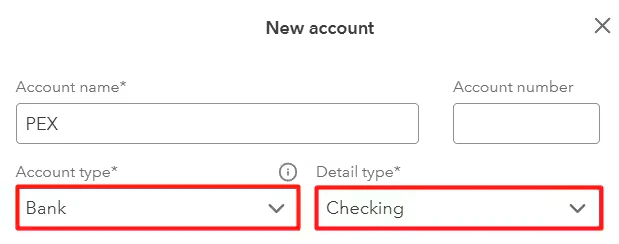
If your PEX account is **prepaid**:
* Select **Bank** for the account type.
* Select **Checking** for the detail type.
 If your PEX account is **credit**:
* Select **Credit Card** for the account type.
* Select **Credit Card** for the detail type.
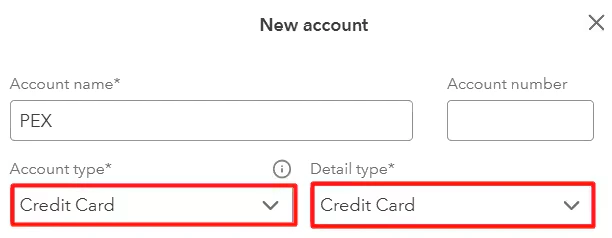
If your PEX account is **credit**:
* Select **Credit Card** for the account type.
* Select **Credit Card** for the detail type.
 **Note:**
Many customers choose to use PEX as the bank name. If you have or may have multiple PEX accounts, consider using PEX along with the name of the business (e.g. PEX John's Theater Co, PEX Kelly's Events Inc). You should set up a PEX account in QuickBooks for each account before the **first** export of transactions can be completed.
To import PEX transactions into QuickBooks Online via a file download, see [How to Export Transactions via a File Download to QuickBooks Desktop or QuickBooks Online](/administrator-guide/how-to-export-transactions-via-a-file-download-to-quickbooks-desktop-or-quickbooks-online).
**Note:**
Many customers choose to use PEX as the bank name. If you have or may have multiple PEX accounts, consider using PEX along with the name of the business (e.g. PEX John's Theater Co, PEX Kelly's Events Inc). You should set up a PEX account in QuickBooks for each account before the **first** export of transactions can be completed.
To import PEX transactions into QuickBooks Online via a file download, see [How to Export Transactions via a File Download to QuickBooks Desktop or QuickBooks Online](/administrator-guide/how-to-export-transactions-via-a-file-download-to-quickbooks-desktop-or-quickbooks-online).