> ## Documentation Index
> Fetch the complete documentation index at: https://support.pexcard.com/llms.txt
> Use this file to discover all available pages before exploring further.
# How to Close Multiple Cards at Once on All Programs
> Closing cards in a batch is quick and convenient. The cards will be shown as Closed on the Administrator Site.
Once PEX cards are closed, they can **not** be reactivated.
**Note:**
You must order new cards for cardholders whose cards have been closed
## How to close multiple cards at once
Click the "Cards" tab on the left side navigation
* You can use the "Filters" on the top left of the list of cards or use the "Find in this table" feature to find the cards you wish to close
Check the boxes to the left of the names of the cards you want to close
* You must choose cards that are either Inactive, Active or Blocked
Click the "Status" dropdown above the card list to change the Status of the selected set of cards in a bulk action
Select "Closed" as the status
Click "Change Status" to confirm you wish to close the cards
* If you change your mind, choose "Cancel" or use the "x" in the top right to close the confirmation modal
Check the status of your change by clicking the tab titled "Batch Operations"
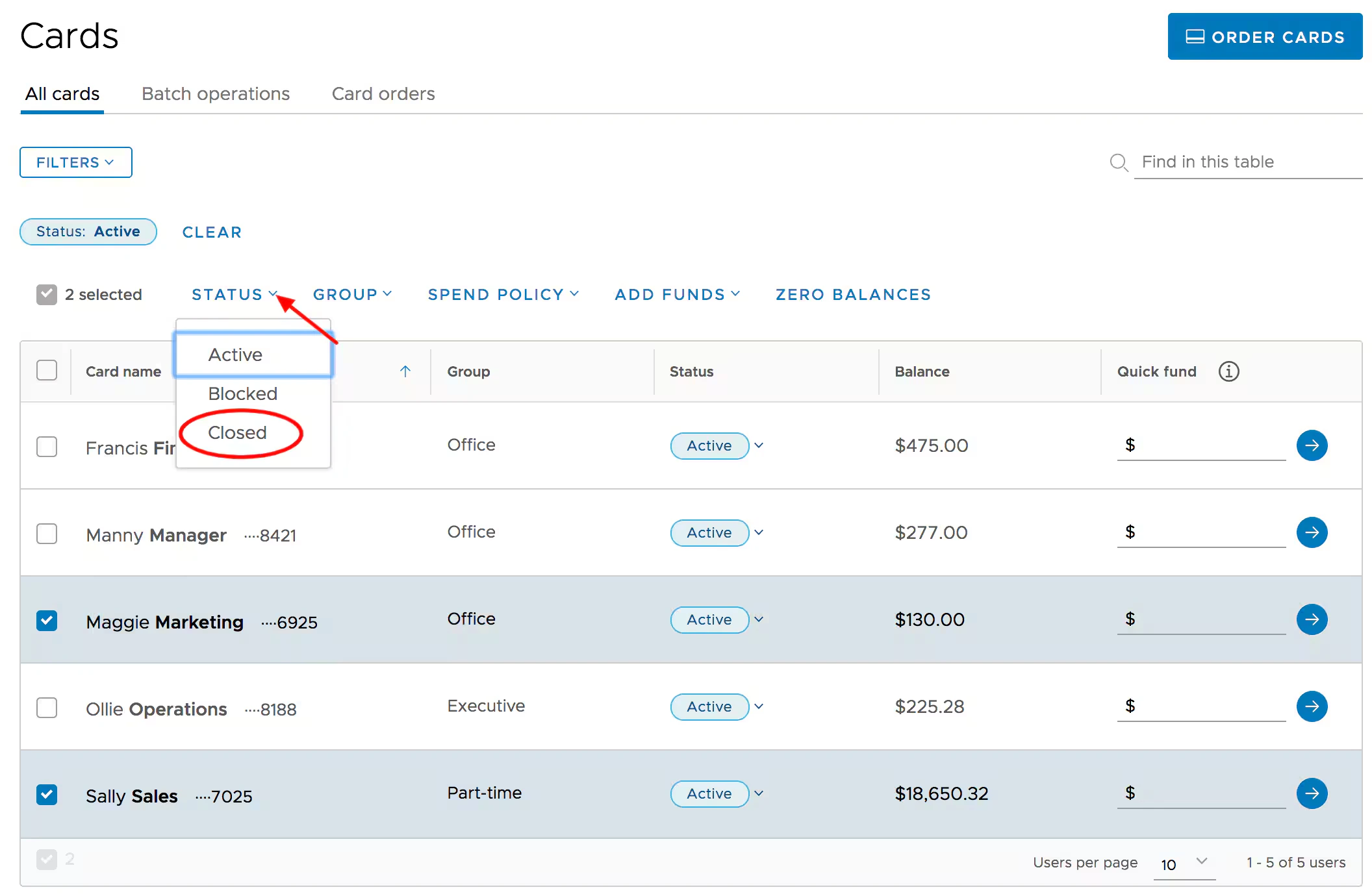 *Click the "Status" button above the card list to change the Status of the selected cards to Closed*
**Note:**
* Batch card edits/changes are scheduled
* They are instantly acknowledged onscreen, but it may take a few moments to see the updates
You might find this article useful, if you would like to learn how to search cards based on certain criteria: "[How to Search Cards](/administrator-guide/searching-for-a-card)"
*Click the "Status" button above the card list to change the Status of the selected cards to Closed*
**Note:**
* Batch card edits/changes are scheduled
* They are instantly acknowledged onscreen, but it may take a few moments to see the updates
You might find this article useful, if you would like to learn how to search cards based on certain criteria: "[How to Search Cards](/administrator-guide/searching-for-a-card)"