> ## Documentation Index
> Fetch the complete documentation index at: https://support.pexcard.com/llms.txt
> Use this file to discover all available pages before exploring further.
# How to Transfer Funds to Your External Bank Account (via the Mobile App)
> Administrators can transfer funds to their external bank account from their PEX account using the PEX Mobile App.
**Note:**
The external bank account must be on record with PEX
Download the Mobile App:
* Download the [iOS app from the App Store](https://itunes.apple.com/app/id584331280)
* Download the [Android app from the Google Play Store](https://play.google.com/store/apps/details?id=com.softjourn.pexcardholder\&hl=en_US)
* The download is free but carrier data rates may apply
**How to Transfer Funds to Your External Bank Account from Your PEX Account Using the Mobile App:**
Log into the Mobile App
Click on the "Transfers" icon at the bottom of the screen
Click on "Transfers"
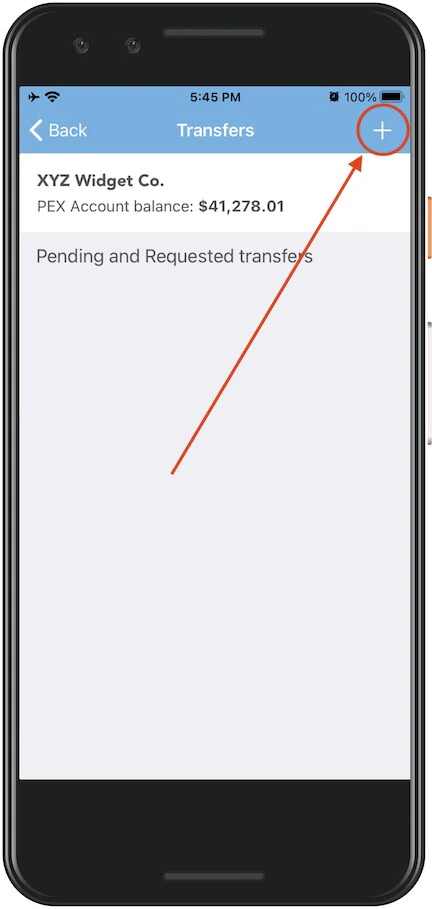 *Click on the Transfers icon. Click on "Transfers."*
Click on the "**+**" sign at top right to initiate a new transfer
*Click on the Transfers icon. Click on "Transfers."*
Click on the "**+**" sign at top right to initiate a new transfer
 *Click on the "**+**" sign at top right*
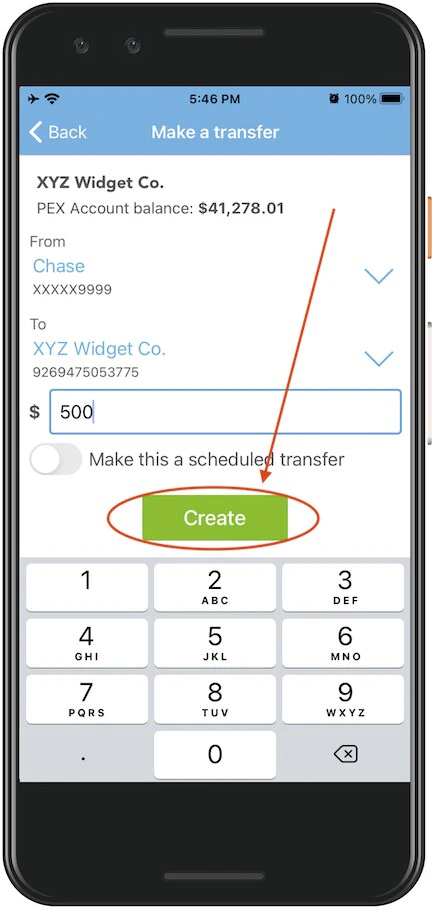
Select the PEX account to transfer funds "From" (from the dropdown menu -- if there is only one choice it will be preselected)
Select the external bank account to transfer funds "To"
Enter the amount to transfer
Click the green "Create" button
*Click on the "**+**" sign at top right*
Select the PEX account to transfer funds "From" (from the dropdown menu -- if there is only one choice it will be preselected)
Select the external bank account to transfer funds "To"
Enter the amount to transfer
Click the green "Create" button
 *Click the green "Create" button*
Click "Transfer" in the confirmation dialogue box
*Click "Transfer" in the confirmation dialogue box*
**Note:**
**Any transfers from your PEX business account by administrators to your bank will incur a \$10 outbound ACH transfer fee.** These and other fees are outlined on our [pricing page](https://www.pexcard.com/pricing/complete-pricing-details/?utm_source=support).
*Click the green "Create" button*
Click "Transfer" in the confirmation dialogue box
*Click "Transfer" in the confirmation dialogue box*
**Note:**
**Any transfers from your PEX business account by administrators to your bank will incur a \$10 outbound ACH transfer fee.** These and other fees are outlined on our [pricing page](https://www.pexcard.com/pricing/complete-pricing-details/?utm_source=support).