> ## Documentation Index
> Fetch the complete documentation index at: https://support.pexcard.com/llms.txt
> Use this file to discover all available pages before exploring further.
# How to view and understand your rebate details
> Learn how PEX rebates work and where to view your rebate totals in the Dashboard.
## Where to find your rebate details
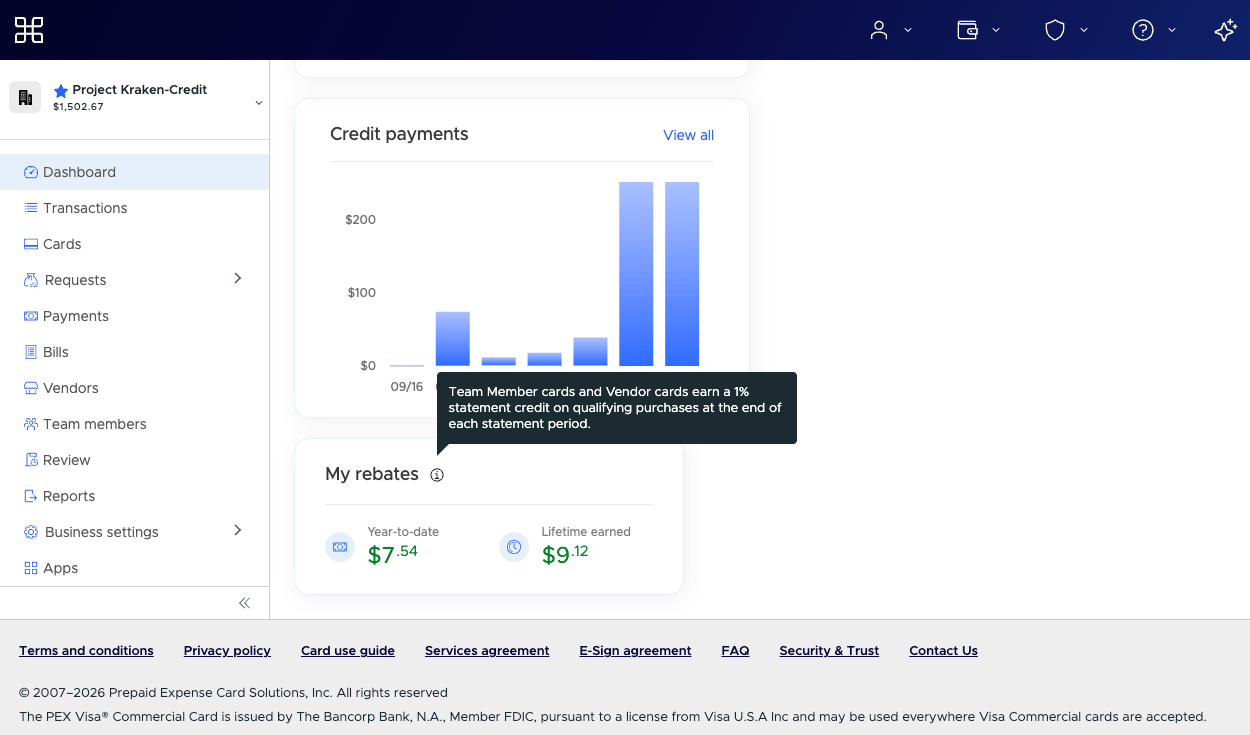
If your account earns rebate rewards, the **My rebates** widget appears on the main Dashboard when you log in as an administrator. It displays:
* **Year-to-date** — Rebate amount earned this year
* **Lifetime earned** — Total rebates earned since account creation
 **Note:** Not every account earns rebates. If your program doesn't include a rebate, you won't see the rebate details described below.
## If you don't see the My rebates widget
If the **My rebates** widget isn't on your Dashboard, your account may not earn rebates, or the feature may not be enabled for your account. Contact your PEX account manager or [PEX Support](https://www.pexcard.com/contact-us/) if you have questions about rebates on your account.
## Understanding your rebates
### What rebates are
Rebates are a percentage of your qualifying card spend that we return to your account. They are our way of giving you back a portion of what you spend on everyday business purchases.
### Which transactions are eligible
We count settled card purchases made during a calendar month. To be eligible, a purchase must be:
* made with a U.S. merchant
* a signature, online or card-not-present purchase
The following are not eligible:
* PIN debit transactions
* international purchases
* purchases at certain excluded merchants, such as Walmart, Amazon, Costco, Target, CVS, PayPal, Venmo, Starbucks and a few others
* refunds and reversals that reduce the month's qualifying spend
### Vendor card rebates vs. Member card rebates
Your PEX account can have two kinds of card spend:
| Card type | What it is |
| -------------------------------------------- | -------------------------------------------------------------- |
| Vendor cards | Virtual cards created for a specific vendor or supplier |
| Member cards (also called team member cards) | Cards for your employees or other members of your organization |
If you have both card types, each one earns its own rate and may be different.
### How rebates are calculated
Each month we add up the eligible spend for each card type and multiply it by the matching rate:
1. Vendor card spend × vendor rebate rate
2. Member card spend × member rebate rate
3. Add the two amounts together
If your account has only one active card type, we use that rate only.
### When rebates are paid
Rebates are processed once per month. We pay the rebate for one calendar month on the last business day of the next month.
* Spend in June is paid at the end of July.
* For charge accounts, the rebate is applied as a statement credit to the current billing invoice.
* For prepaid accounts, the rebate is deposited into your account.
**Note:** Starting in August 2026, charge rebates are moving from the billing cycle to a monthly calendar schedule. The change is happening in waves, so your account may switch on a different date. Once your account is on the new schedule, the rebate is calculated on one calendar month and paid on the last business day of the next month.
### Delinquency check
Before we pay a rebate on a charge account, we check whether the account is delinquent. If the account is past due when we process that month's rebate, the rebate is forfeited. Once the account is current, future rebates will continue to be paid.
Prepaid accounts are not subject to a delinquency check because they are funded before spending.
## Frequently asked questions
**How do I know if my account earns rebates?**
**Note:** Not every account earns rebates. If your program doesn't include a rebate, you won't see the rebate details described below.
## If you don't see the My rebates widget
If the **My rebates** widget isn't on your Dashboard, your account may not earn rebates, or the feature may not be enabled for your account. Contact your PEX account manager or [PEX Support](https://www.pexcard.com/contact-us/) if you have questions about rebates on your account.
## Understanding your rebates
### What rebates are
Rebates are a percentage of your qualifying card spend that we return to your account. They are our way of giving you back a portion of what you spend on everyday business purchases.
### Which transactions are eligible
We count settled card purchases made during a calendar month. To be eligible, a purchase must be:
* made with a U.S. merchant
* a signature, online or card-not-present purchase
The following are not eligible:
* PIN debit transactions
* international purchases
* purchases at certain excluded merchants, such as Walmart, Amazon, Costco, Target, CVS, PayPal, Venmo, Starbucks and a few others
* refunds and reversals that reduce the month's qualifying spend
### Vendor card rebates vs. Member card rebates
Your PEX account can have two kinds of card spend:
| Card type | What it is |
| -------------------------------------------- | -------------------------------------------------------------- |
| Vendor cards | Virtual cards created for a specific vendor or supplier |
| Member cards (also called team member cards) | Cards for your employees or other members of your organization |
If you have both card types, each one earns its own rate and may be different.
### How rebates are calculated
Each month we add up the eligible spend for each card type and multiply it by the matching rate:
1. Vendor card spend × vendor rebate rate
2. Member card spend × member rebate rate
3. Add the two amounts together
If your account has only one active card type, we use that rate only.
### When rebates are paid
Rebates are processed once per month. We pay the rebate for one calendar month on the last business day of the next month.
* Spend in June is paid at the end of July.
* For charge accounts, the rebate is applied as a statement credit to the current billing invoice.
* For prepaid accounts, the rebate is deposited into your account.
**Note:** Starting in August 2026, charge rebates are moving from the billing cycle to a monthly calendar schedule. The change is happening in waves, so your account may switch on a different date. Once your account is on the new schedule, the rebate is calculated on one calendar month and paid on the last business day of the next month.
### Delinquency check
Before we pay a rebate on a charge account, we check whether the account is delinquent. If the account is past due when we process that month's rebate, the rebate is forfeited. Once the account is current, future rebates will continue to be paid.
Prepaid accounts are not subject to a delinquency check because they are funded before spending.
## Frequently asked questions
**How do I know if my account earns rebates?**
If your program includes rebates, the **My rebates** widget appears on your PEX Dashboard. Not every account has rebates. Contact your PEX account manager or [PEX Support](https://www.pexcard.com/contact-us/) if you have questions about rebates on your account.
**When will I receive my rebate?**
Rebates are processed once per month and paid on the last business day of the following month.
**How is my rebate amount calculated?**
We multiply your eligible vendor card spend by the vendor rebate rate and your eligible member card spend by the member rebate rate, then add the two amounts together.
**How can I see my rebate activity?**
Your year-to-date and lifetime rebate totals appear in the **My rebates** widget on your PEX Dashboard.
**Can I still earn rebates if my account is past due?**
For charge accounts, a rebate for a month is forfeited if the account is delinquent when we process it. Once the account is current, future rebates resume.
**Why are some purchases not eligible for rebates?**
PIN debit, international purchases and purchases at certain merchants do not meet our rebate program terms, so they are excluded from qualifying spend.
## Note for existing customers
Until August 2026, the rebate schedule worked slightly differently. Charge rebates were paid together with the billing cycle. Prepaid rebates were generated on the second Wednesday of the following month.
## Rebate terms
The amounts shown on your Dashboard are a summary. For the full details of how rebates are earned and applied, see the [PEX Credit Expense Card Program Terms](https://www.pexcard.com/legal/credit-expense-card-program-terms/).