> ## Documentation Index
> Fetch the complete documentation index at: https://support.pexcard.com/llms.txt
> Use this file to discover all available pages before exploring further.
# Relinking unlinked bank accounts on Prepaid Expense
> PEX uses Instant Account Verification via Open Banking Providers to link customer external bank accounts used to create transfers and fund your business account. Instant Account Verification via Open Banking Providers is third party technology that provides data connectivity to most banks in the United States.
Follow the steps below to relink your unlinked external bank account:
Log in to the Dashboard via [https://dashboard.pexcard.com](https://dashboard.pexcard.com/?utm_source=support)
Navigate to the 'Business settings' from the sidebar menu and click.
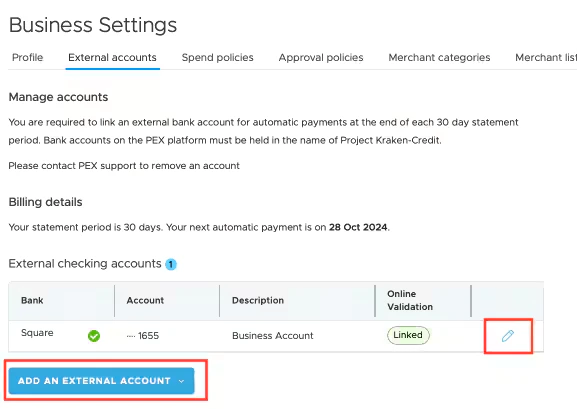
Click on the 'External accounts' tab at the top of the 'Business settings' page.
Find the external bank account that should be relinked.
* Under the 'Online Validation' column, you will see it labeled 'Unlinked'.
Click on the pencil icon to edit your external bank account.
Click on the 'Relink External Account' on the 'Edit external account' page.
Follow the steps provided by the Instant Account Verification via Open Banking Providers linking dialogue.
* Follow the steps eventually leading you to your bank's login portal to provide your credentials for verification.
* If the relinking method described above results in an error message, you can try adding the same account or another bank account with the "Add an External Account" button on the main "External accounts" page. Adding a duplicate bank account this way will fully replace it with a fresh Instant Account Verification via Open Banking Providers connection. To duplicate the bank account, click on the dropdown arrow option on the blue *Add an External Account* button.\
You will be guided through the same Instant Account Verification via Open Banking Providers linking dialogue, though there may be additional verification steps depending on your bank. Once the bank account has been linked, the Online validation field showing *unlinked* should update to *linked.* Linked banks can be used for Same Day ACH transfers.
 ## FAQ
* Sometimes the Instant Account Verification via Open Banking Providers link for your external bank account can become unlinked. This usually happens if you make a change to your banking login credentials or Instant Account Verification via Open Banking Providers have made updates that require a customer to relink. For some banks, the Instant Account Verification via Open Banking Providers link can also time out. Your bank may email to notify you if your bank account becomes unlinked. You can verify if your bank account has become unlinked by navigating to your bank account on your PEX dashboard by going to Business settings-> External accounts. It will be listed under the "Online validation" column and will reflect as either linked or unlinked.
* No, you can not make Same Day ACH transfers from your unlinked external bank accounts.
* Yes, you can make ACH transfers from your unlinked external bank accounts. However, you won't be able to make Same Day ACH transfers if your external bank account gets unlinked. Try relinking, duplicating, or readding the bank account with the above steps.
* Click on the 'Add an external account' button at the bottom of the 'External accounts' page, agree to the terms, and follow the steps provided by the Instant Account Verification via Open Banking Providers linking dialogue.
## FAQ
* Sometimes the Instant Account Verification via Open Banking Providers link for your external bank account can become unlinked. This usually happens if you make a change to your banking login credentials or Instant Account Verification via Open Banking Providers have made updates that require a customer to relink. For some banks, the Instant Account Verification via Open Banking Providers link can also time out. Your bank may email to notify you if your bank account becomes unlinked. You can verify if your bank account has become unlinked by navigating to your bank account on your PEX dashboard by going to Business settings-> External accounts. It will be listed under the "Online validation" column and will reflect as either linked or unlinked.
* No, you can not make Same Day ACH transfers from your unlinked external bank accounts.
* Yes, you can make ACH transfers from your unlinked external bank accounts. However, you won't be able to make Same Day ACH transfers if your external bank account gets unlinked. Try relinking, duplicating, or readding the bank account with the above steps.
* Click on the 'Add an external account' button at the bottom of the 'External accounts' page, agree to the terms, and follow the steps provided by the Instant Account Verification via Open Banking Providers linking dialogue.