> ## Documentation Index
> Fetch the complete documentation index at: https://support.pexcard.com/llms.txt
> Use this file to discover all available pages before exploring further.
# Tracking your card order
> Look up the shipment tracking number for a PEX card order and review expected delivery windows for Priority, Expedited, and Rushed shipping.
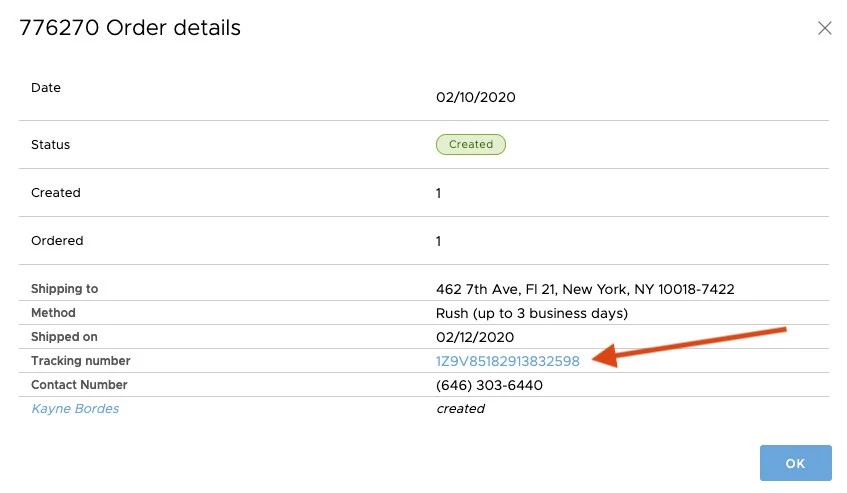
Administrators can find a shipment tracking number for card orders on the "Card order history" page in the Administrator Site.
Card tracking information is typically available 4 business days after the card order is placed, not including the day the card order was submitted. Tracking is provided for the following shipping methods:
1. Priority Delivery: Expected within 4-8 business days
2. Expedited Delivery: Expected within 5 business days
3. Rushed Delivery: Expected within 4 business days
## **How to Track a Card Order**
1. Log in to [dashboard.pexcard.com](https://dashboard.pexcard.com?utm_source=support)
* Click the "Cards" tab in the left navigation
* Click the "Card orders" tab
* Click on the card order from the list to see order details on the order date
* Review the tracking method and shipment date
* Click on the Tracking Number to check the status of a card order.
**Note:**
This will open a page on a 3rd party shipping website for additional tracking and delivery information.
* PEX is unable to make changes or intercept deliveries. To schedule a redelivery, make address or receiver name changes, inquiries, etc, contact your local delivery service and provide your tracking number.