> ## Documentation Index
> Fetch the complete documentation index at: https://support.pexcard.com/llms.txt
> Use this file to discover all available pages before exploring further.
# Vendor payment notifications
> Email vendors when you pay their bill by bank transfer (ACH) - how to turn it on, where PEX sends the email and what it contains
When you pay a bill by bank transfer (ACH), PEX can email your vendor to let them know the payment is on its way. The email tells them who paid, how much, which invoice it covers and when to expect the money.
 ## Turn vendor payment notifications on or off
Vendor payment notifications are off by default. To change the setting:
1. Go to **Business settings** → **Profile**
2. Scroll to the **Settings** section and click **Edit**
3. Under **Vendor payment notifications**, select **Enable** or **Disable**
4. Click **Update**
## Turn vendor payment notifications on or off
Vendor payment notifications are off by default. To change the setting:
1. Go to **Business settings** → **Profile**
2. Scroll to the **Settings** section and click **Edit**
3. Under **Vendor payment notifications**, select **Enable** or **Disable**
4. Click **Update**
 **Vendor payment notifications** only appears when **Bill pay** is set to **Enable**. If Bill pay is set to **Disable**, the setting is hidden.
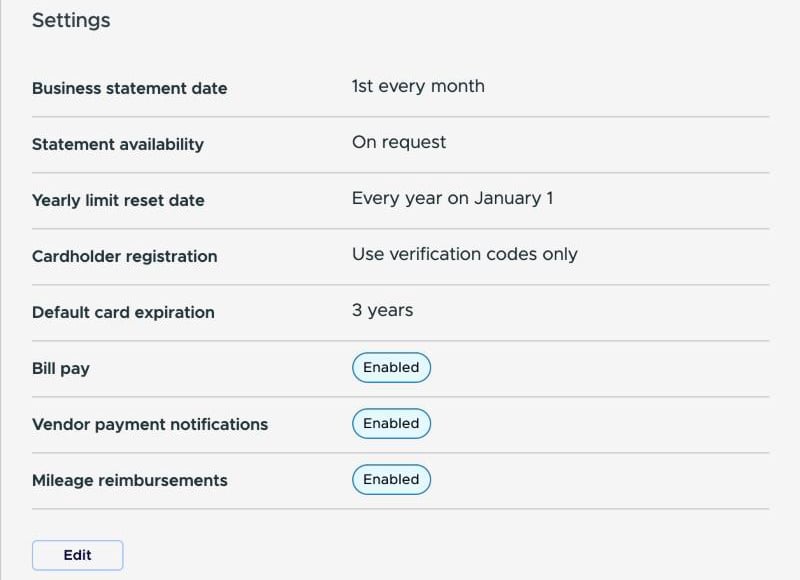
Once saved, the **Settings** section shows **Vendor payment notifications** as **Enabled**.
**Vendor payment notifications** only appears when **Bill pay** is set to **Enable**. If Bill pay is set to **Disable**, the setting is hidden.
Once saved, the **Settings** section shows **Vendor payment notifications** as **Enabled**.
 You don't need a new permission. Admins who can edit business settings can change this setting, and admins who can manage vendors can update a vendor's remittance email.
## Choose where the email goes
PEX sends the email to the **Email (for remittance)** address on the vendor's record. To set it:
1. Go to **Vendors**
2. Open the vendor and click **Edit**
3. Under **Payment Information**, enter the address in **Email (for remittance)**
4. Save your changes
The field appears whenever **Vendor Card** or **ACH** is turned on for the vendor. It's required:
* When **Vendor Card** is on
* For **ACH** when Vendor payment notifications is enabled for your business
If you fill in the vendor's contact **Email** first, PEX copies it into **Email (for remittance)** for you.
You don't need a new permission. Admins who can edit business settings can change this setting, and admins who can manage vendors can update a vendor's remittance email.
## Choose where the email goes
PEX sends the email to the **Email (for remittance)** address on the vendor's record. To set it:
1. Go to **Vendors**
2. Open the vendor and click **Edit**
3. Under **Payment Information**, enter the address in **Email (for remittance)**
4. Save your changes
The field appears whenever **Vendor Card** or **ACH** is turned on for the vendor. It's required:
* When **Vendor Card** is on
* For **ACH** when Vendor payment notifications is enabled for your business
If you fill in the vendor's contact **Email** first, PEX copies it into **Email (for remittance)** for you.
 To send payment notices somewhere else, such as an accounts receivable inbox, type a different address in **Email (for remittance)**. After that, changing the contact email no longer updates it.
 If a required remittance email is missing, the form shows **Email is required** under the field.
 ## What the email contains
PEX sends one email per bill when its ACH payment starts processing. If you pay three bills to the same vendor in one batch, the vendor gets three emails, each naming its own invoice.
Each email includes:
* Your business name and the vendor name
* The payment amount
* The invoice number, invoice date, due date and invoice amount
* The payment type, payment date and expected arrival date
* A reference number
* A short footer explaining why the vendor got the email and telling them to contact your business with questions
The expected arrival date is an estimate based on the normal ACH processing window, not a confirmation from the vendor's bank. The email says the payment is "expected to arrive by" that date.
## Frequently asked questions
### My vendor says they didn't get the email. What should I check?
* The vendor's **Email (for remittance)** is correct
* **Vendor payment notifications** is enabled in **Business settings** → **Profile** → **Settings**
* The bill was paid by ACH and has reached **Processing**
### Can I turn notifications off for one vendor only?
No. The setting applies to your whole business. While the setting is disabled, you can leave **Email (for remittance)** empty for an ACH-only vendor. Once the setting is enabled, the field is required.
### Do I get a copy of the email?
No. The notification goes only to the vendor. To choose the notifications you receive yourself, see [How to Enable Admin Notifications](/administrator-guide/how-to-enable-admin-notifications).
### Does the vendor get a second email when the money arrives?
No. Vendors get one email per bill, when the payment starts processing.
### Is an email sent for payments recorded as paid outside PEX?
No. Payments recorded as paid outside PEX don't send a vendor payment notification.
### What if my vendor has questions about a payment?
Vendors aren't PEX users, so the email tells them to contact your business directly. PEX can't change or stop a payment on your behalf.
## Related topics
- [Getting Started with Bill Pay](/administrator-guide/getting-started-with-bill-pay.md)
- [Bill Pay: Create & Send a Bill Payment](/administrator-guide/create-and-send-a-bill-payment.md)
- [Manage & Troubleshoot Bill Pay](/administrator-guide/manage-troubleshoot-bill-pay.md)
- [Managing your business settings](/administrator-guide/managing-your-business-settings.md)
- [How to Enable Admin Notifications](/administrator-guide/how-to-enable-admin-notifications.md)
This documentation is built and hosted on [Mintlify](https://mintlify.com), a developer documentation platform.
## What the email contains
PEX sends one email per bill when its ACH payment starts processing. If you pay three bills to the same vendor in one batch, the vendor gets three emails, each naming its own invoice.
Each email includes:
* Your business name and the vendor name
* The payment amount
* The invoice number, invoice date, due date and invoice amount
* The payment type, payment date and expected arrival date
* A reference number
* A short footer explaining why the vendor got the email and telling them to contact your business with questions
The expected arrival date is an estimate based on the normal ACH processing window, not a confirmation from the vendor's bank. The email says the payment is "expected to arrive by" that date.
## Frequently asked questions
### My vendor says they didn't get the email. What should I check?
* The vendor's **Email (for remittance)** is correct
* **Vendor payment notifications** is enabled in **Business settings** → **Profile** → **Settings**
* The bill was paid by ACH and has reached **Processing**
### Can I turn notifications off for one vendor only?
No. The setting applies to your whole business. While the setting is disabled, you can leave **Email (for remittance)** empty for an ACH-only vendor. Once the setting is enabled, the field is required.
### Do I get a copy of the email?
No. The notification goes only to the vendor. To choose the notifications you receive yourself, see [How to Enable Admin Notifications](/administrator-guide/how-to-enable-admin-notifications).
### Does the vendor get a second email when the money arrives?
No. Vendors get one email per bill, when the payment starts processing.
### Is an email sent for payments recorded as paid outside PEX?
No. Payments recorded as paid outside PEX don't send a vendor payment notification.
### What if my vendor has questions about a payment?
Vendors aren't PEX users, so the email tells them to contact your business directly. PEX can't change or stop a payment on your behalf.
## Related topics
- [Getting Started with Bill Pay](/administrator-guide/getting-started-with-bill-pay.md)
- [Bill Pay: Create & Send a Bill Payment](/administrator-guide/create-and-send-a-bill-payment.md)
- [Manage & Troubleshoot Bill Pay](/administrator-guide/manage-troubleshoot-bill-pay.md)
- [Managing your business settings](/administrator-guide/managing-your-business-settings.md)
- [How to Enable Admin Notifications](/administrator-guide/how-to-enable-admin-notifications.md)
This documentation is built and hosted on [Mintlify](https://mintlify.com), a developer documentation platform.