> ## Documentation Index
> Fetch the complete documentation index at: https://support.pexcard.com/llms.txt
> Use this file to discover all available pages before exploring further.
# How to Check My Card Balance on All Programs
> There are a few ways to check your PEX card balance — pick whichever is easiest for you. The dashboard and mobile app require a Cardholder User Account; the automated phone line and text alerts don't.
## Jump to: [Dashboard](#check-your-balance-on-the-dashboard) | [Mobile app](#check-your-balance-on-the-pex-mobile-app) | [Phone](#check-your-balance-by-phone) | [Text message alerts](#get-your-balance-by-text-message)
* Don't have a Cardholder User Account? See [How to create a new Cardholder User Account](/cardholder-guide/how-to-create-a-new-cardholder-user-account)
* Trouble logging in? See [Troubleshooting cardholder login](/cardholder-guide/troubleshooting-cardholder-user-login)
## Check your balance on the dashboard
1. Log in to [dashboard.pexcard.com](http://dashboard.pexcard.com)
2. Your "Available Balance" is displayed on the Dashboard tab, which loads by default when you log in Note: your "Available balance" is the amount you're able to spend. It may differ from your "Current Balance" because of pending transactions that haven't settled yet - click the Transactions tab to see those.
## Check your balance on the PEX mobile app
Download the app if you haven't already - it's free, though carrier data rates may apply:
* [iOS app (App Store)](https://itunes.apple.com/app/id584331280)
* [Android app (Google Play)](https://play.google.com/store/apps/details?id=com.softjourn.pexcardholder)
Then:
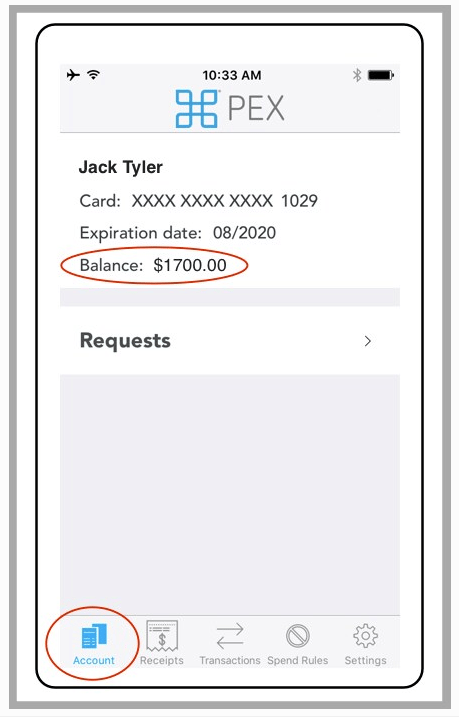
1. Log in to the PEX mobile app
2. Tap the "Account" icon
3. Your account balance appears on the screen
 ## Check your balance by phone
No account needed. Call **866-685-0898**. You'll be prompted to enter your card information to locate your account, along with the company's billing zip code.
## Get your balance by text message
You can also have your balance sent to you by text — no account needed:
1. Call 866-685-0898 and follow the prompts to check your balance (see above)
2. Once your balance has been read to you, press 3 to opt in to text alerts
3. You'll get a text message with your balance
4. Reply to that text with the last 4 digits of your card to confirm
5. Repeat step 1–4 any time you want a new balance update by text
## Still stuck?
If you can't create or log in to a Cardholder User Account, check with your business administrator - they can also look up your card balance for you directly.
**Note:**
* If you are unable to create a Cardholder User Account, please check with your business administrator
* Your business administrator can also tell you your card balance
## Check your balance by phone
No account needed. Call **866-685-0898**. You'll be prompted to enter your card information to locate your account, along with the company's billing zip code.
## Get your balance by text message
You can also have your balance sent to you by text — no account needed:
1. Call 866-685-0898 and follow the prompts to check your balance (see above)
2. Once your balance has been read to you, press 3 to opt in to text alerts
3. You'll get a text message with your balance
4. Reply to that text with the last 4 digits of your card to confirm
5. Repeat step 1–4 any time you want a new balance update by text
## Still stuck?
If you can't create or log in to a Cardholder User Account, check with your business administrator - they can also look up your card balance for you directly.
**Note:**
* If you are unable to create a Cardholder User Account, please check with your business administrator
* Your business administrator can also tell you your card balance