> ## Documentation Index
> Fetch the complete documentation index at: https://support.pexcard.com/llms.txt
> Use this file to discover all available pages before exploring further.
# Submitting a request for mileage reimbursement
> How to submit a mileage reimbursement request as a Cardholder and track its status
Cardholder users can submit a request for mileage reimbursement by following the steps below.
## Submitting a mileage reimbursement request
Log in to the Dashboard at [dashboard.pexcard.com](https://dashboard.pexcard.com?utm_source=support).
Navigate to **Requests** from the sidebar menu.
Click the **Reimbursements** sub-menu.
Click **New Reimbursement** in the top right corner.
Select **Enter mileage details** from the dropdown menu.
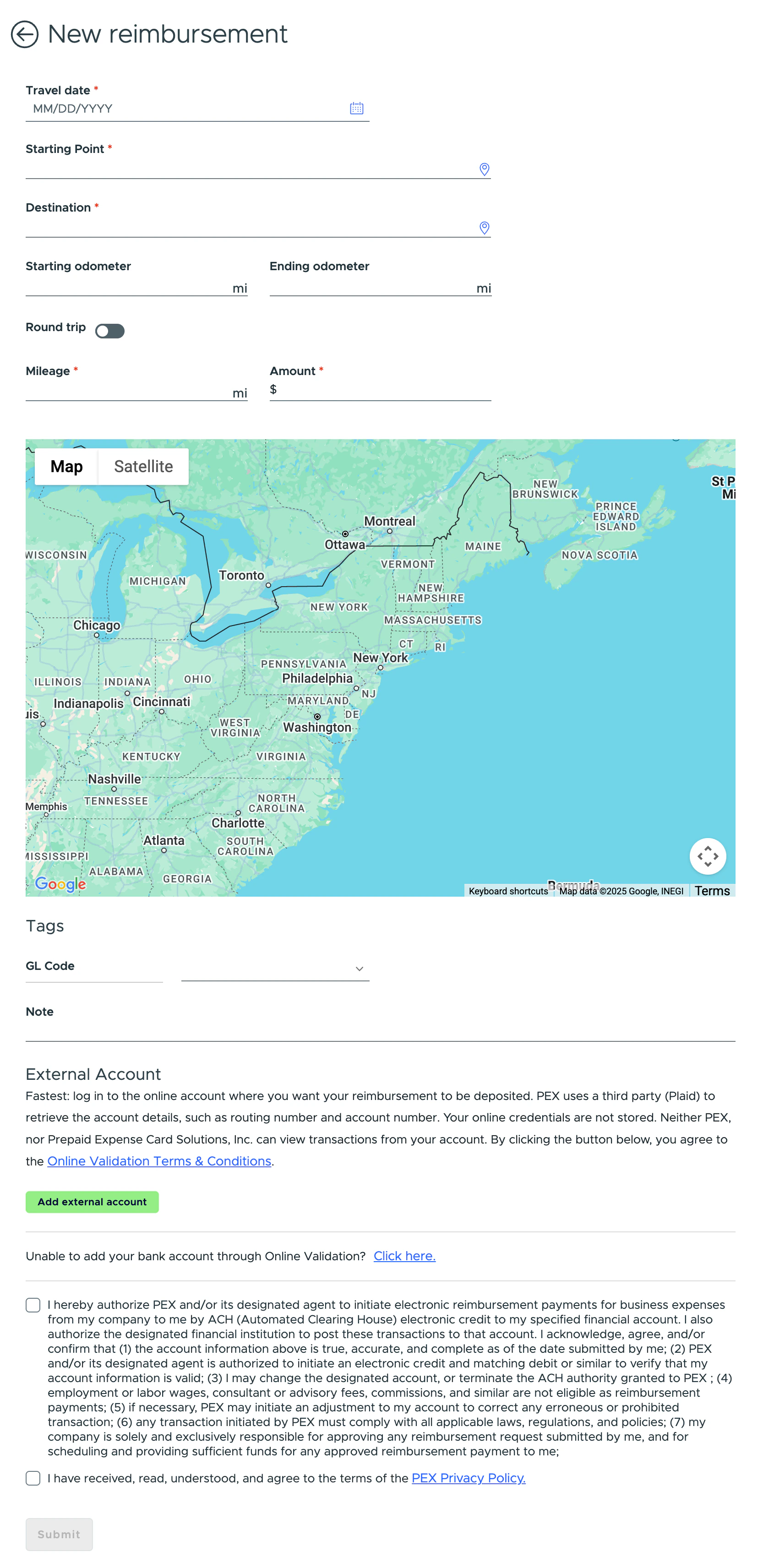
Click the calendar icon to select the travel date.
Enter the address of your starting point.
Enter the address of your destination.
* PEX uses Google Maps to calculate the distance between your starting point and destination.
* If only the starting point and destination are provided, the mileage and reimbursement amount are calculated based on the calculated distance.
Enter the starting odometer value (optional).
Enter the ending odometer value (optional). If you have a round trip, turn on the **Round trip** toggle.
Review the mileage and reimbursement amount calculated based on your provided details and the reimbursement rate.
Provide tag values under the **Tags** section (optional).
Enter a **Note** if you want to include one with your request (optional).
Click **Add an external account** under the **External account** section and log in to your bank account for Instant Account Verification via Open Banking Providers.
* If you cannot log in via Instant Account Verification, click the **Click here** link under "Add an external account" to provide your account and routing numbers manually.
* You only need to provide external bank account details the first time you submit a reimbursement request.
Check the two agreement checkboxes at the bottom of the page. You only need to agree to the agreements the first time you submit a reimbursement request.
Click **Submit**.
 ## Viewing your request status
Log in to the Dashboard at [dashboard.pexcard.com](https://dashboard.pexcard.com?utm_source=support).
Navigate to **Requests** from the sidebar menu.
Click the **Reimbursements** sub-menu.
* The **New Requests** tab displays all reimbursement requests pending approval.
* The **History** tab displays all approved and rejected reimbursement requests.
**Note:**
You'll receive an email or push notification when your reimbursement request is approved or rejected.
## Tracking the payment status
Log in to the Dashboard at [dashboard.pexcard.com](https://dashboard.pexcard.com?utm_source=support).
Navigate to **Payments** from the sidebar menu. The Payments page displays all payments settled to your external bank account.
**Note:**
One payment may contain multiple reimbursement requests if they were paid in one payment.
## FAQ
**Can I submit a mileage reimbursement request via the mobile app?**
Yes, you can use the mobile app to submit a mileage reimbursement request.
**How do I know about my request approval/rejection?**
You'll receive a notification (email and push) once your reimbursement request is approved or rejected.
**Why don't I see the "Enter mileage details" option?**
Your admin may have disabled the mileage reimbursement feature for your account.
**Can I change the reimbursement rate for mileage?**
No, only admins can change the reimbursement rate.
## Viewing your request status
Log in to the Dashboard at [dashboard.pexcard.com](https://dashboard.pexcard.com?utm_source=support).
Navigate to **Requests** from the sidebar menu.
Click the **Reimbursements** sub-menu.
* The **New Requests** tab displays all reimbursement requests pending approval.
* The **History** tab displays all approved and rejected reimbursement requests.
**Note:**
You'll receive an email or push notification when your reimbursement request is approved or rejected.
## Tracking the payment status
Log in to the Dashboard at [dashboard.pexcard.com](https://dashboard.pexcard.com?utm_source=support).
Navigate to **Payments** from the sidebar menu. The Payments page displays all payments settled to your external bank account.
**Note:**
One payment may contain multiple reimbursement requests if they were paid in one payment.
## FAQ
**Can I submit a mileage reimbursement request via the mobile app?**
Yes, you can use the mobile app to submit a mileage reimbursement request.
**How do I know about my request approval/rejection?**
You'll receive a notification (email and push) once your reimbursement request is approved or rejected.
**Why don't I see the "Enter mileage details" option?**
Your admin may have disabled the mileage reimbursement feature for your account.
**Can I change the reimbursement rate for mileage?**
No, only admins can change the reimbursement rate.