

Get set up
To get started, ensure that the following is set up:1
Go to the Business settings menu
2
Scroll down to the Settings section
3
Click Edit
- Check “Remind cardholders when missing receipt(s)”
- If disabled, Cardholders will not receive receipt reminders via email.
- You can disable Cardholders from managing receipt reminder email/push notifications. If you check this checkbox, your Cardholders will not be able to turn off receiving receipt reminder email/push notifications.
- You can set a minimum purchase amount to trigger a receipt reminder to Cardholders. For example, if you select $100 your Cardholders will receive receipt reminders only when their purchase transaction is above $100. Leave this empty if you want to send receipt reminders for every purchase.
- Ensure you can see the Business Attachments section
- This should be on by default. If disabled, Cardholders will not be able to match receipts.
- Enable Receipt Matching
- This should be on by default and will allow PEX AI to automatically match receipts to transactions.
4
Click Update
Cardholders to enable email reminder
To help get your Cardholders set up, ensure your Cardholders enable receipt reminders in their profiles. They will need to follow these steps: Ensure your email is verified:1
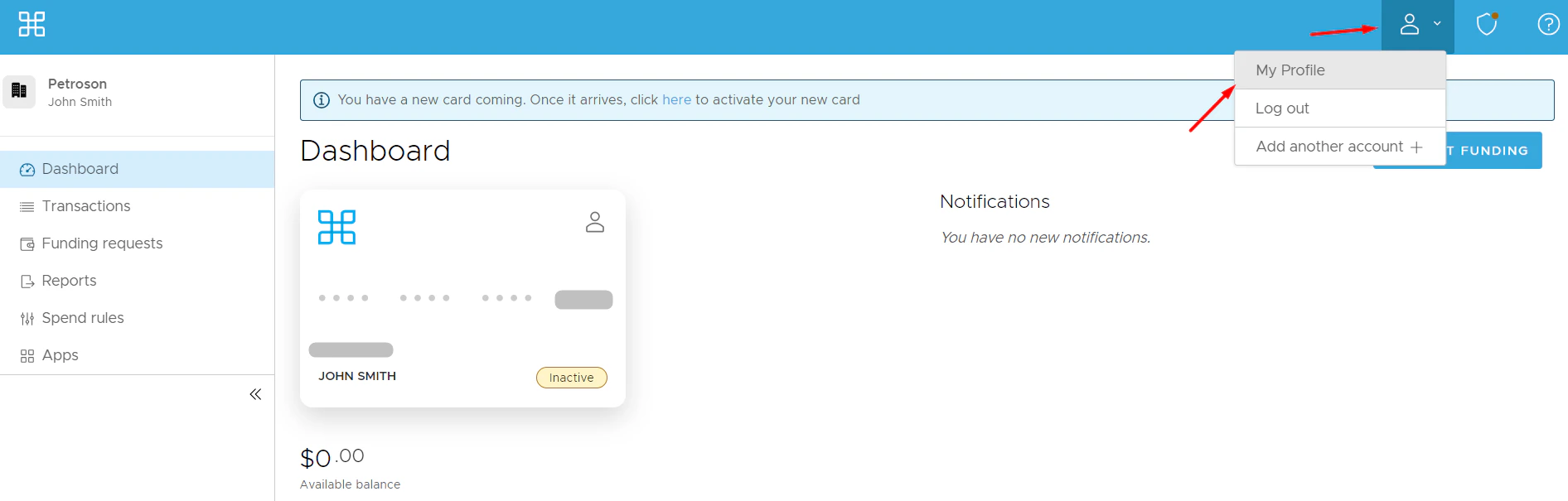
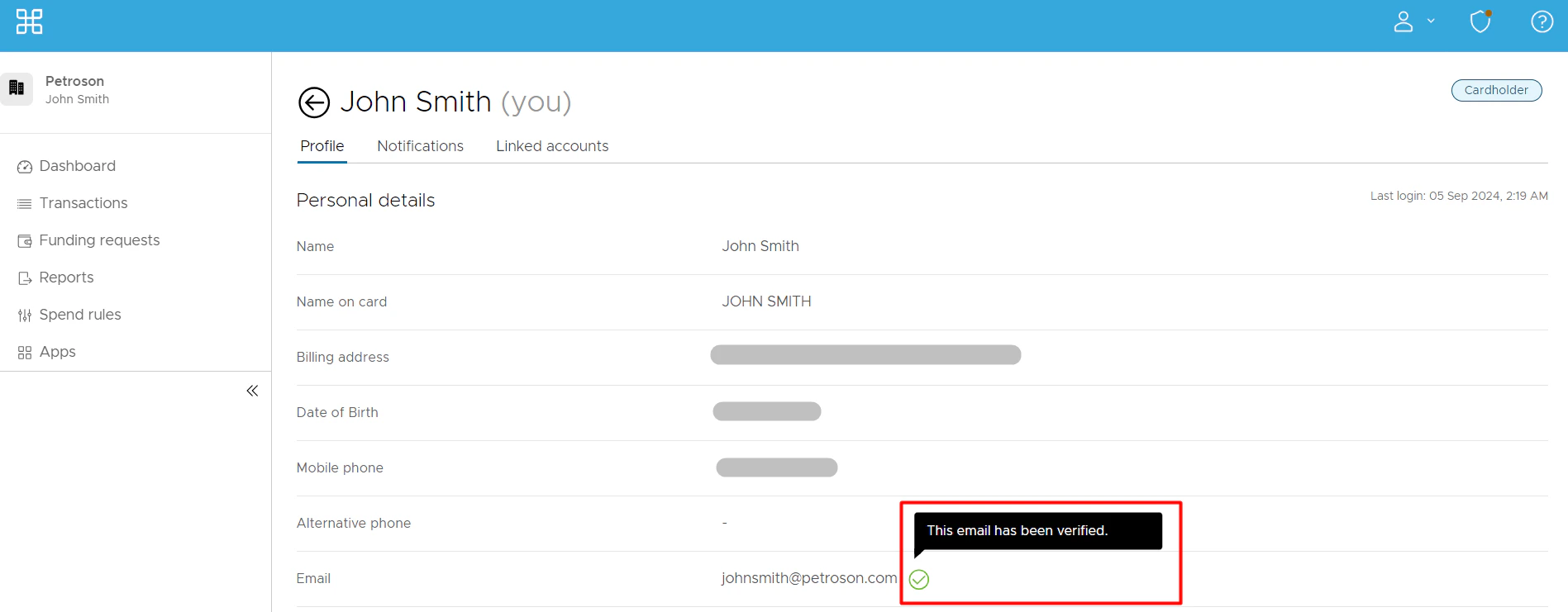
2
You can add a new email address for receipt reminders:
- Click Edit Profile
- Edit your email address
- Click Update
- Enter your secure access code you have received
- Click Continue
3
Verify the email you would like to receive email receipt reminders to:
- Click Verify
- Enter the Secure Access Code you have received
- Click Verify
1
Go to the Notifications tab
2
Locate the “Receipt reminder” notification
3
Check the email box across it
4
Click Update Notifications
Send email without reminder
You and your Cardholders can email in receipts without a receipt reminder straight to receipts@pexcard.com- When you email in the receipt image or images (you can send more than one), we will auto match the receipt(s) to its/their corresponding transaction(s). Once done, we’ll send you an email confirming the successful auto match.
- When emailing in the receipt image or images, make sure that the email you use is verified. To verify the email:
- Click on the Person icon at the top right → Select My Profile
- Locate your email address
- If you want to add a new email address for receipt reminders:
- Click Edit Profile
- Edit your email address
- Click Update
- Enter your secure access code you have received
- Click Continue
- If you want to add a new email address for receipt reminders:
Note:All the settings mentioned in the “Get set up” section have to be enabled so you and your Cardholders can email in receipts when you want.
PEX email responses
If you email a receipt on behalf of your Cardholder, you might receive these email notifications in response:- Success match
- The receipt has been successfully auto matched.
- Duplicate receipt
- The receipt has either been previously submitted or it has already been mapped to a transaction.
- No match
- We are having trouble matching your submitted receipt to a transaction. Please manually attach via the dashboard or mobile app.
FAQ
Is there a cardholder guide on emailing receipts to PEX?
Is there a cardholder guide on emailing receipts to PEX?
Yes. You can share this guide with your Cardholders — Email to PEX (Cardholder Guide).
Do I need to text you a receipt amount along with the image?
Do I need to text you a receipt amount along with the image?
No need to email and text. You and your Cardholders can submit in whichever channel you prefer.
The receipt is too long. Can I email you images of different parts of the receipt?
The receipt is too long. Can I email you images of different parts of the receipt?
Yes. Make sure the receipt has a date and total amount paid visible.
Can I email you more than one receipt?
Can I email you more than one receipt?
Of course! We will auto match the receipts to their corresponding transactions.
Can I email receipts in HTML format?
Can I email receipts in HTML format?
Yes! We will auto match the receipts to their corresponding transactions.
Can I email receipts as multi-page PDFs?
Can I email receipts as multi-page PDFs?
Sure! We will auto match the receipts to their corresponding transactions.
Is there any other way I can send you a receipt?
Is there any other way I can send you a receipt?
Yes. You can text a photo of your receipt via SMS to PEX at this number: (640) 800-7522. More info here: Text to PEX (Admin Guide)
Is there any other way to remind my cardholders to send in receipts?
Is there any other way to remind my cardholders to send in receipts?
Yes. Send bulk receipt reminders via email to all your Cardholders who have not added receipts to transactions yet:
- Go to the Transactions menu
- Click Filters
- Select Attachments
- Select No attachment
- Click Add
- Select all transactions in the table or the ones you need
- Click Actions
- Select Send receipt reminder (you can optionally add a note)
- Click Send
Is emailing a receipt available for both Prepaid and Credit accounts?
Is emailing a receipt available for both Prepaid and Credit accounts?
Yes.
Why do I see my email attached to the transaction?
Why do I see my email attached to the transaction?
When you email a receipt, only the receipt is saved to the transaction. However, if the email is missing an inline or attached receipt, we attach the email itself instead.
Why didn't my receipt match?
Why didn't my receipt match?
To ensure best matching results:
- Ensure your receipt has a date and total amount paid visible.
- Submit receipts only for purchases made using your PEX card.