Connect PEX and OneDrive
To connect your PEX and OneDrive from the PEX Marketplace follow these steps:1
Log in to http://dashboard.pexcard.com/
2
Navigate to Apps > Available
3
Locate Connector for OneDrive.
4
Click More info > Install > Launch.
Note:To install the connector, you need to enable the following permissions: Edit business settings & apps, Manage cardholder, View card transactions. You can enable them in My Profile -> Permissions.
1
Once the app has launched for the first time click “Connect” on the right side panel to begin.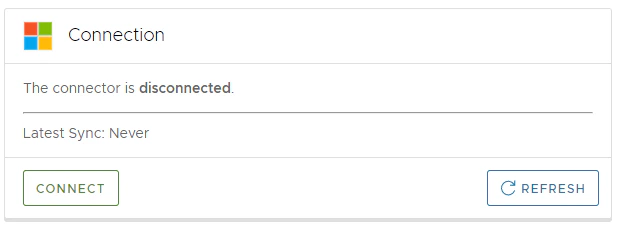
2
The app will request the following permissions to read your file structure. Click “Continue”.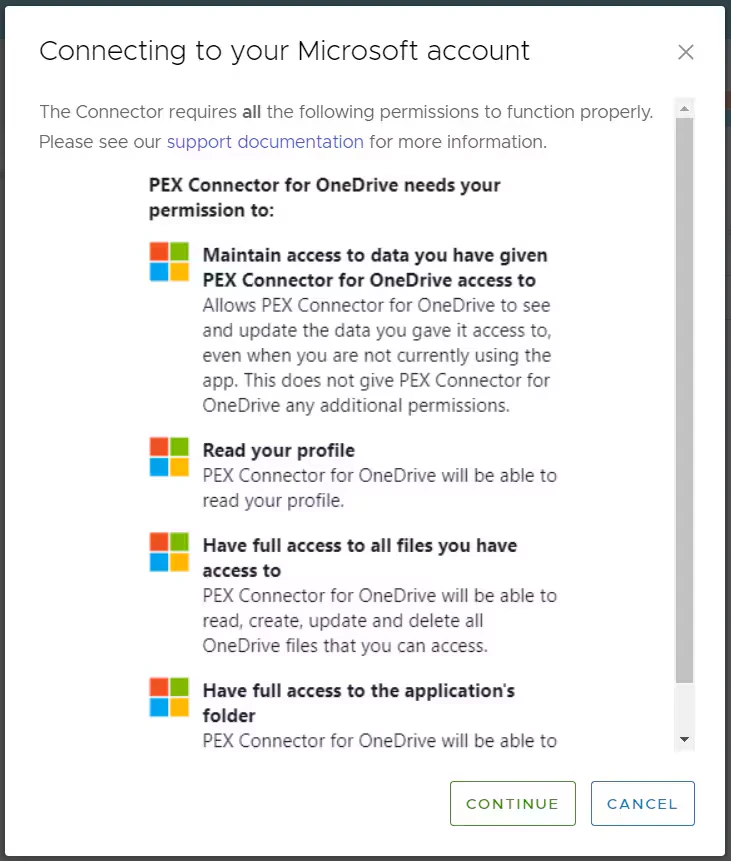
3
You will be directed to “Sign In” or select an already signed in OneDrive account. Click “Accept” to give PEX permission to access your OneDrive.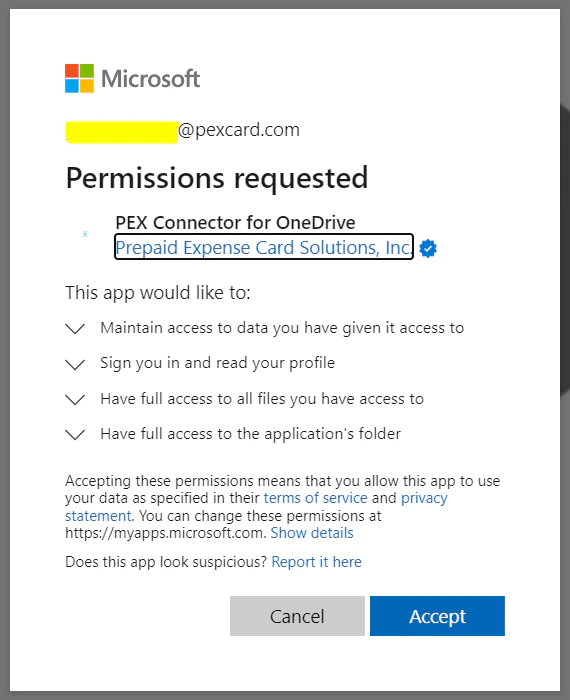
Configure settings
1
Fill in following options:
- Purchase Receipts. Select “Approved” or “All” transactions (“Approved” is recommended).
- Start Date. This is the date to start syncing from. Used by manual sync only. It cannot be more than 1 year in the past. Leave empty to default to the first day of the prior month.
- End Date. This is the final date of sync. Used by manual sync only. Leave empty to default to today.
- Drive. The OneDrive drive to sync receipts to. The list shows the drives available to the signed-in Microsoft account; most accounts have only one. Leave empty to use your default drive.
- Path Template. Customize how you would like your receipts to be displayed within your OneDrive folder. Click the arrow on the right side to select one of the different file options.
- Automatic Sync. Enable this to sync receipts on a schedule (every 6 hours). Automatic sync does not use the Start Date and End Date fields.
2
Press Save Options to save your settings, then press Sync Receipts to start a manual sync.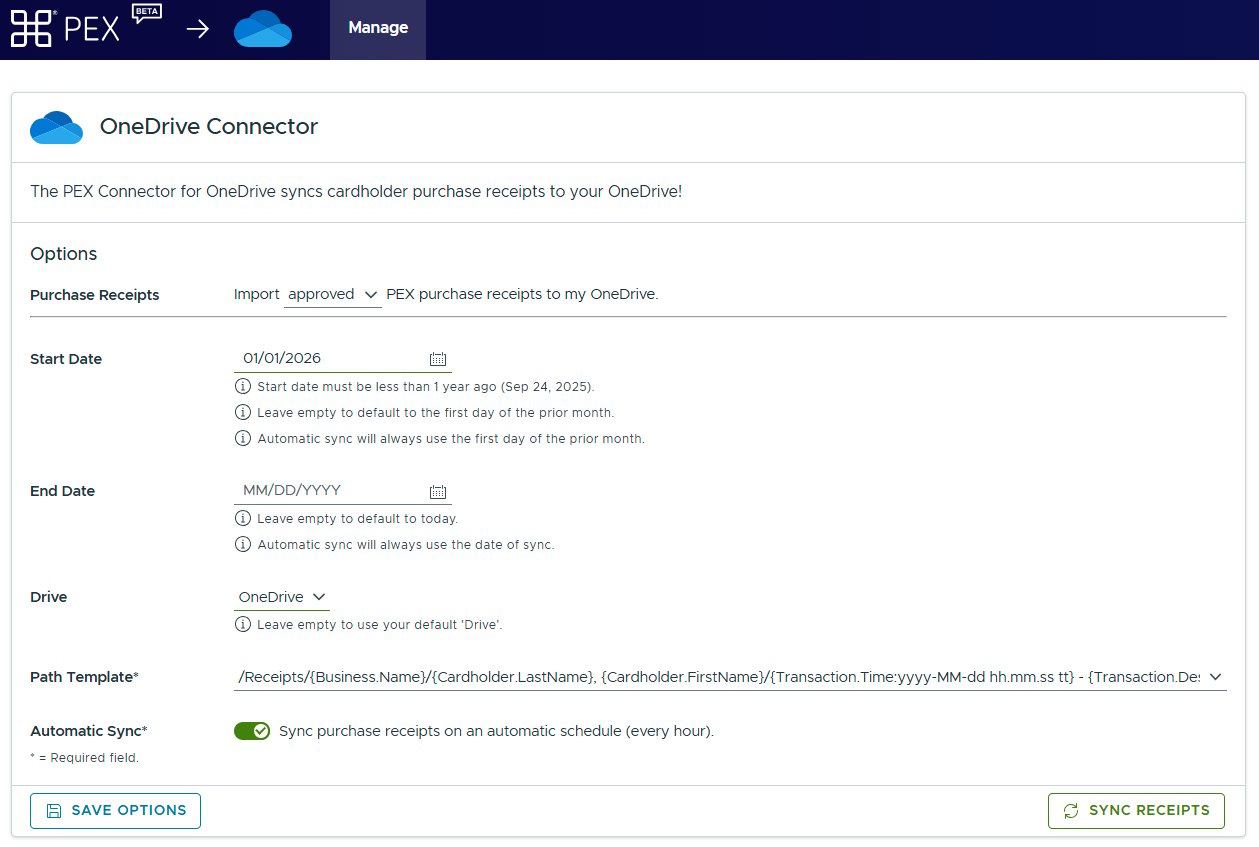
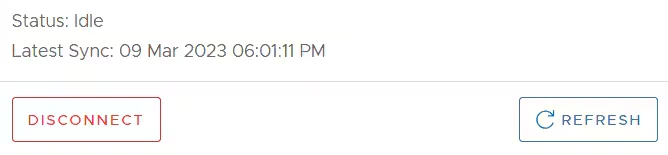
Sync
Manual sync (Sync Receipts button) uses the Start Date and End Date you enter. If Start Date is empty, it defaults to the first day of the prior month. If End Date is empty, it defaults to today. The Start Date cannot be more than 1 year in the past, so a manual sync can never include transactions older than 1 year. Automatic sync does not use the Start Date and End Date fields. Every run looks only at transactions dated from the first day of the month before last up to the moment of the sync (for example, a run on September 21, 2026 covers July 1, 2026 to September 21, 2026). Transactions are selected by their transaction date, not by the date they were approved or the date the receipt was attached. A receipt attached to a transaction older than this window will not be picked up by automatic sync. Run a manual sync with a Start Date covering that transaction instead.Frequently asked questions
What happens/shows up if all of your Approved Transactions are synced over but you're missing a transaction that turns out to be unapproved?
What happens/shows up if all of your Approved Transactions are synced over but you're missing a transaction that turns out to be unapproved?
On the history tab, there is a view of all receipts “total” and the total number that have been synced “processed”.
How often does it sync if you don't enable the auto sync?
How often does it sync if you don't enable the auto sync?
It will sync every time you click the “Sync Receipts” button.
How often does automatic sync run, and which transactions does it include?
How often does automatic sync run, and which transactions does it include?
Automatic sync runs every 6 hours. Each run covers transactions dated from the first day of the month before last up to the time of the run (for example, on September 21, 2026 it covers July 1, 2026 to September 21, 2026). The Start Date and End Date fields are not used by automatic sync. Transactions are filtered by transaction date, not by approval date.
A receipt was attached (or the transaction was approved) recently, but it didn't sync. Why?
A receipt was attached (or the transaction was approved) recently, but it didn't sync. Why?
If the transaction date is older than the automatic sync window (first day of the month before last), automatic sync no longer checks that transaction, even if the receipt or approval is new. Run a manual sync with a Start Date on or before the transaction date (up to 1 year back). If the transaction is more than 1 year old, the connector cannot sync it. Upload the receipt to OneDrive manually.
What do the permissions mean when connecting to OneDrive?
What do the permissions mean when connecting to OneDrive?
Default OpenId scopes:
openid- The app receives a unique identifier for the user.profile- Allows the app to see your users’ basic info (name, picture, user name).email- Allows the app to see your users’ primary email address.
offline_access- Allows the app to store and refresh its tokens used for API access.
User.Read- Allows users to sign-in to the app, and allows the app to read the profile of signed-in users. It also allows the app to read basic company information of signed-in users.Files.ReadWrite.AppFolder- Allows the app to read, create, update, and delete files in the application’s folder. The user’s other files and folders are never accessed by the application.
What does each status mean in the top right bar on the Manage page?
What does each status mean in the top right bar on the Manage page?
- Idle - PEX is not actively syncing to OneDrive (ad hoc syncs only)
- Pending - PEX is waiting for a queued sync (manual or automatic) to start syncing to OneDrive
- Syncing - PEX is currently syncing receipts to OneDrive
Are there any limitations for the start date?
Are there any limitations for the start date?
The Start Date is max 1 year in the past. This applies to manual sync only. Automatic sync always uses its own window (first day of the month before last up to the time of sync) and ignores the Start Date.
Does the sync date range have any limitations?
Does the sync date range have any limitations?
The only limitation is that the Start Date can be up to 1 year in the past, and the End Date must be on or after the Start Date. For example, a range like June 15 to December 15, 2024 would be valid if today is June 15, 2025.
Where does the Path Template come from?
Where does the Path Template come from?
We’ve incorporated feedback to come up with the most common types of configurations. Let us know if you have another preferred way to store receipts and we can update accordingly.
How do I re-download receipts?
How do I re-download receipts?
Previously synced receipts will not re-download if the file is already present in the PEX Receipts file hierarchy or if it has a sync note from being previously downloaded.