

What is early auto payment?
Early auto payment automatically triggers a payment when your credit usage reaches a threshold you set (default 80%). This prevents declined transactions and keeps your business running smoothly. Available for Credit Expense accounts only.How it works
- Your credit line has a configurable threshold (default 80%).
- When your balance reaches that threshold or more, the system automatically pays your full balance from your linked bank account, restoring your credit line.
- The system checks once daily around 11 AM ET.
- Payment covers your entire outstanding balance, not just the threshold amount.
How to activate
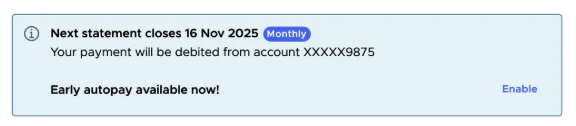
Choose one of these options:- From Dashboard: Click Enable on the Dashboard statement information box
- From Transactions: Go to Transactions > Make a payment > Early auto payment
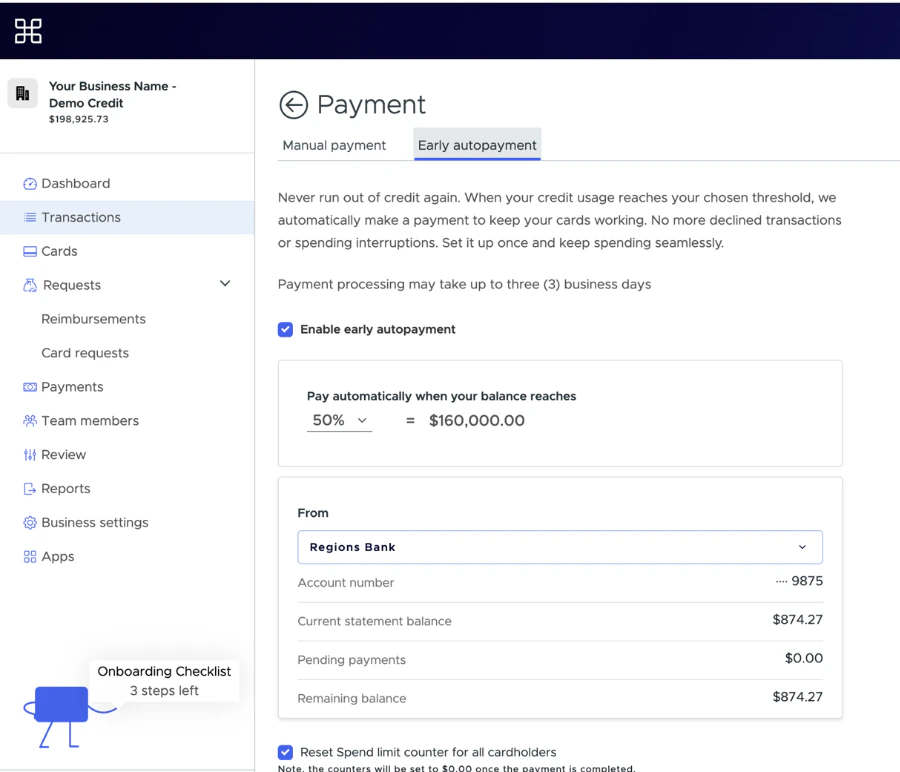
- Threshold percentage (default 80%)
- Bank account for payments
- Reset spend limit (optional)
How to modify or disable
1
Go to the Early auto payment page.
2
Adjust threshold, bank account or toggle on/off.
3
Save changes.