Documentation Index
Fetch the complete documentation index at: https://support.pexcard.com/llms.txt
Use this file to discover all available pages before exploring further.
Note:Important note for cardholders: If your card is purple, you can activate your card by following the instructions in the cardholder guide that shipped with your card.For all other cards, only a business administrator can activate your card. Please contact your business administrator directly.To register your card and be able to access your card account, please see “How to create a new cardholder account.”
For security purposes, all PEX cards are inactive when they are mailed. As a business administrator, you will need to activate a card before the card can be used for purchases. The instructions below only apply for business administrators on a Prepaid & Charge Expense program. If your cards are purple, cardholders must activate their own cards using the instructions provided above.
How to Activate a New PEX Card as an Administrator
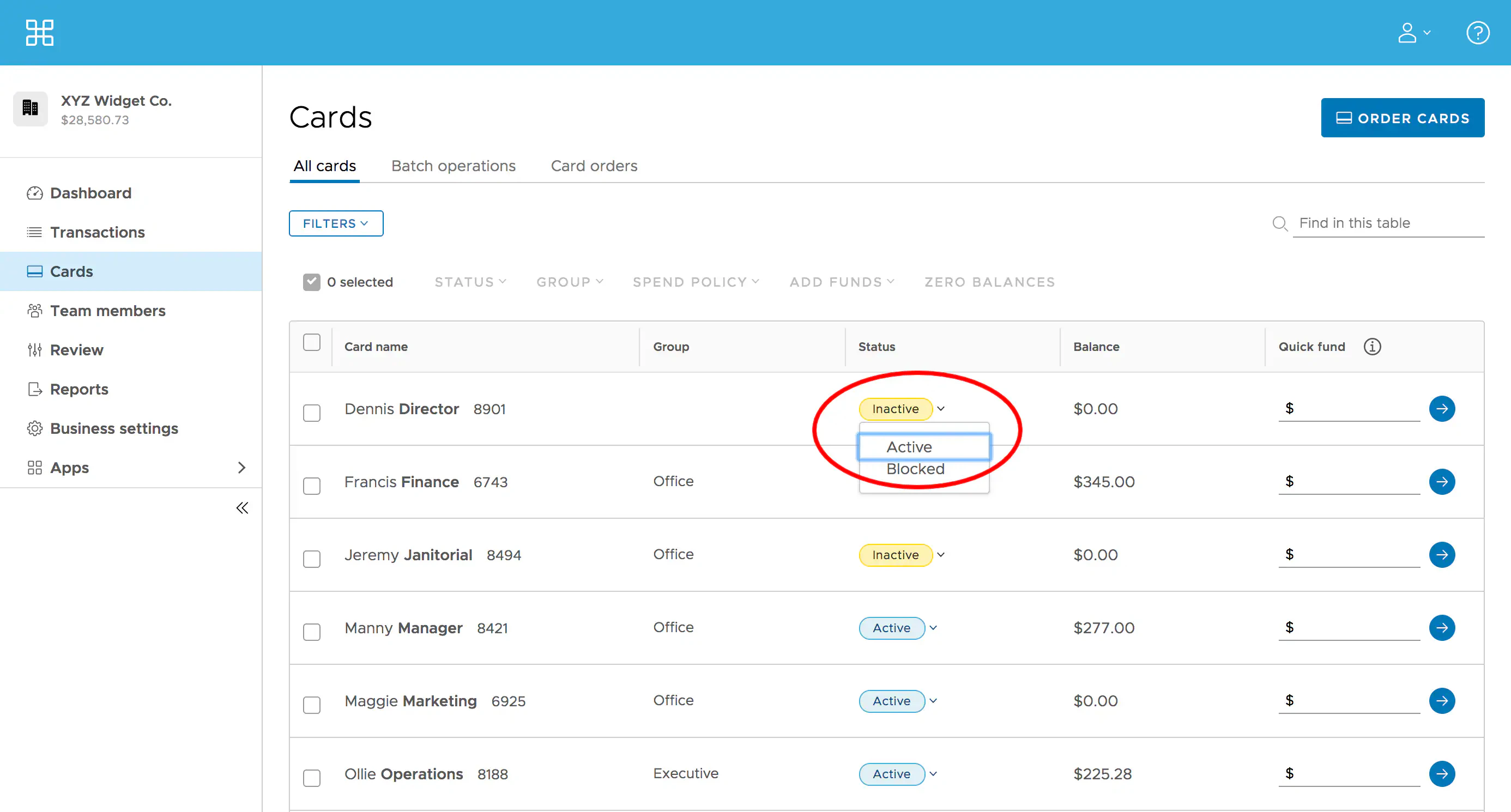
Click the “Cards” tab on the left
Locate the Cardholder’s name
Click the dropdown under Status that says “Inactive”
Click “Active” Status to activate the new PEX Card
If you want to activate multiple cards, you may want to read “How to Activate Multiple Cards”
To learn how to fund a PEX card, read “How to Quick Fund a Card”
If you want to learn how to search cards based on specific criteria, please see “How to Search Cards”