Before you start:
- This can only be done from the web Admin site - it can’t be completed from the mobile app.
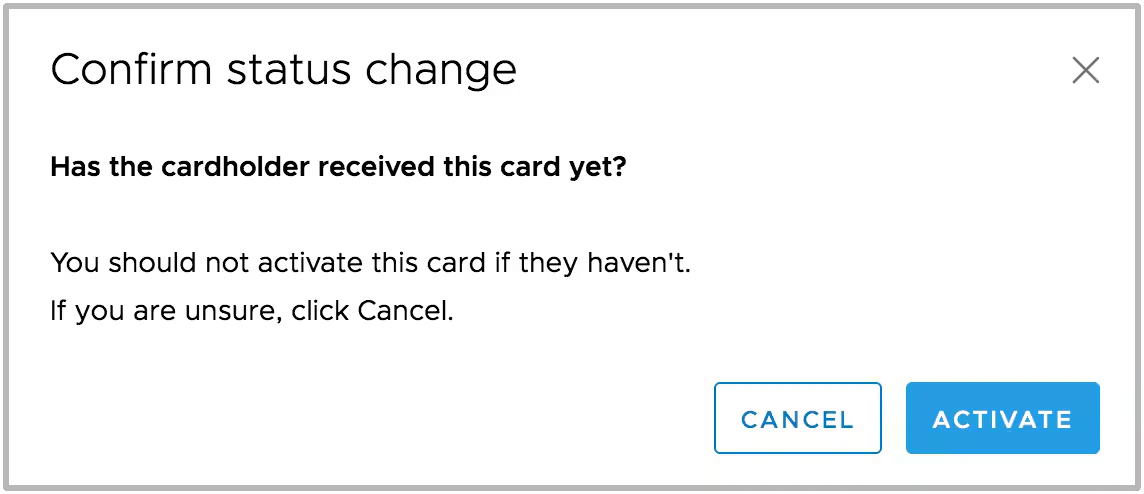
- As soon as you activate the new card, the old card is deactivated instantly and irreversibly. There’s no undo, so don’t activate the replacement until it’s actually arrived.
How to activate a replacement card
- Log in to the Admin site
- Locate the cardholder who was issued the replacement card and click their name - if you’re having trouble finding them, see How to search cards
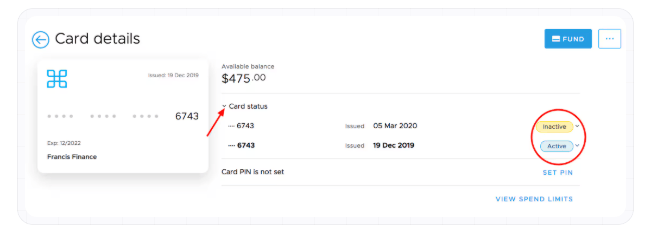
- On the card details page, click the arrow next to “Card Status” to reveal the Active and Inactive cards
- Click the “Inactive” status and select Active from the dropdown
- Review the change and click “Activate” on the confirmation screen - this immediately and irreversibly deactivates the old card, so confirm the replacement is ready before you click